



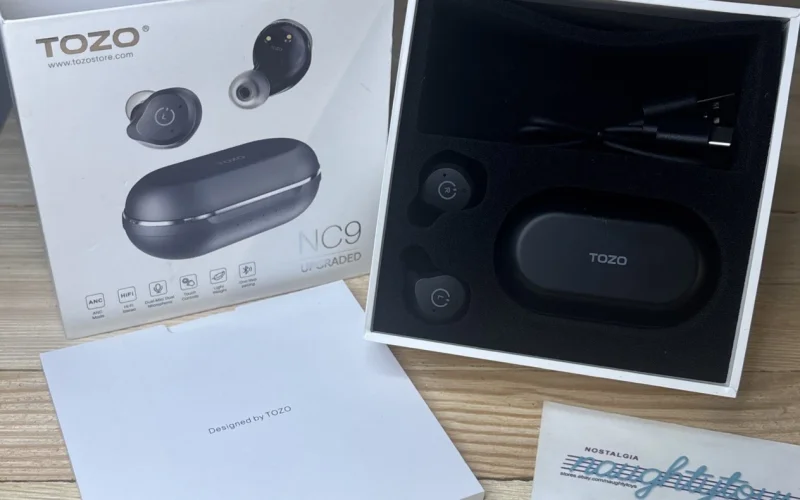
TOZO NC9 earbuds don’t usually stop working because of hardware faults. Most issues come from corrupted pairing memory caused by interrupted charging, switching between devices, or incomplete Bluetooth connections. When this happens, the earbuds lose their internal sync, leading to one side connecting alone, duplicate Bluetooth listings, or unstable pairing that keeps failing. A proper reset clears that stored pairing state and forces both earbuds to re-link correctly before reconnecting to any device. When done in the correct order, the reset restores normal operation reliably, which is why this process matters when learning how to reset TOZO NC9 earbuds
Quick Answer:
To reset TOZO NC9 earbuds, first forget “TOZO-NC9” in your phone’s Bluetooth settings and turn Bluetooth off. Take both earbuds out of the case, then press and hold each touch panel for 5 seconds to power them off (red light). Press and hold each again for 5 seconds until the blue light turns on and off, then double tap each earbud quickly. The reset is complete when the purple light turns on for 1 second, then both earbuds flash red and blue. Turn Bluetooth on and pair again.
How to Reset TOZO NC9 Earbuds
Follow this sequence exactly:
- On your phone, forget/delete “TOZO-NC9” from Bluetooth, then turn Bluetooth off.
- Turn both earbuds off: press and hold the touch control on each earbud for 5 seconds until the red light turns on.
- Factory reset: press and hold the touch control on each earbud for another 5 seconds until the blue light turns on and off.
- Immediately tap the touch control on each earbud twice quickly. The reset is complete when the purple light turns on for 1 second, then both earbuds flash red and blue alternately.
- Turn Bluetooth back on and pair again by selecting “TOZO-NC9”. If pairing fails, delete any old TOZO-NC9 records and repeat the pairing process.
If the reset does not complete as described, TOZO also documents this process on their official TOZO support page.
How to Pair TOZO NC9 Earbuds After Reset
After the reset is complete, keep both earbuds out of the charging case. Turn Bluetooth back on from your phone’s settings and wait a few seconds for the earbuds to enter pairing mode automatically. You should see “TOZO-NC9” appear as a single device in the Bluetooth list. Select it once to connect. When pairing is successful, both earbuds will connect together and audio will play through left and right at the same time. If two separate NC9 entries appear, the reset was not completed correctly and should be repeated.
If pairing doesn’t complete on the first attempt or you’re reconnecting to a new device, follow the detailed steps for how to connect TOZO earbuds to ensure a clean Bluetooth connection.
FAQs about resetting TOZO NC9 earbuds
This happens when the earbuds lose their internal sync due to corrupted pairing data. A full reset restores the link between the left and right earbuds and resolves single-earbud connection issues.
Seeing two entries means the earbuds are no longer paired together internally. Resetting both earbuds clears the old pairing records and forces them to reconnect as one Bluetooth device.
Not always, but a reset is recommended if pairing becomes unstable or the earbuds connect separately. Resetting ensures the earbuds establish a clean connection with the new device.
Yes. The reset is done using the touch controls on both earbuds. The charging case is not required, but it helps stabilize the process before re-pairing.